What Is Inventory Friction? How to Audit Your Shopify Store in Minutes

Co-Founder & CEO
Key Takeaways: Understanding Inventory Friction
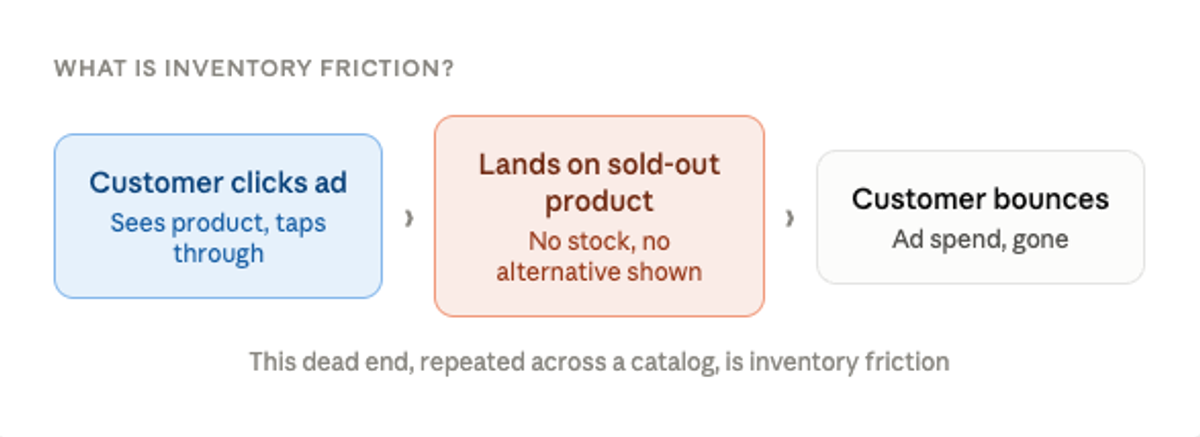
- The Definition: Inventory friction occurs when a customer lands on your store and cannot buy what they came for due to a fully sold-out product or a depleted size run.
- The Financial Impact: Pointing paid ad traffic to sold-out products causes brands to waste an average of 10-15% of their monthly ad budget.
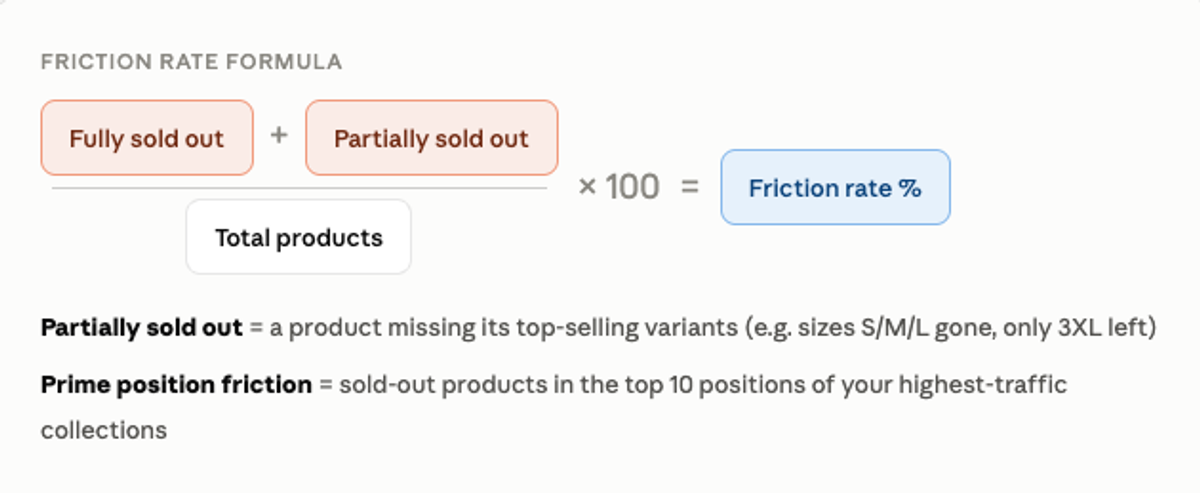
- The Friction Rate: You can quantify exactly how much of your catalog is actively working against conversion by dividing your sold-out products by your total catalog size.
- The Solution: You can automatically audit your collections and fix these merchandising blind spots using a dedicated Shopify intelligence tool like Akikumo.
What Is Inventory Friction?
Inventory friction is what happens when a customer lands on your store and can't buy what they came for. It is a sold-out product sitting in a prime collection position, an ad pointing to a product with no stock, or a size run so depleted it might as well be gone.
Most brands don't know how much friction they have because Shopify doesn't natively surface it. To find it manually, you would have to check every collection, product, and variant—a task no merchant has time for.
The Friction Rate Formula
The friction rate is a single number that tells you what percentage of your catalog is actively working against conversion.
To calculate it: Count your fully sold-out products (zero inventory across all variants). Add your partially sold-out products (missing key variants). Divide that combined number by your total products, and multiply by 100.
| Friction Rate | Severity | What It Means |
|---|---|---|
| 0-10% | Healthy | Minor gaps, manageable |
| 10-20% | Moderate | Noticeable revenue impact |
| 20-30% | High | Significant conversion loss |
| 30%+ | Critical | Immediate action required |
The 5-Step Inventory Friction Audit Methodology
This is the exact process used to audit any Shopify store for inventory friction in under 10 minutes.
- Pull the full catalog using Shopify's public API: Every Shopify store exposes its product data at
[yourdomain.com/products.json](https://yourdomain.com/products.json). This gives you every product, every variant, and every availability status without needing login access. - Calculate the friction rate: Use the formula above to establish your baseline percentage of unpurchasable catalog items.
- Audit the top 10 positions per collection: The top 10 positions in your highest-traffic collections are where the most damage happens. A sold-out product at position 1 means every customer who lands on that page hits a dead end immediately.
- Find cross-collection contamination: The same depleted product appearing in multiple collections multiplies the damage. If your sold-out hoodie is in Best Sellers, New Arrivals, AND Sale—that is three separate traffic sources hitting the exact same dead end.
- Check ads against inventory: Connect your inventory problem directly to wasted ad spend to see exactly where you are paying for dead clicks.
How to Check Ads Against Inventory
This connects the inventory problem directly to wasted ad spend. Brands typically lose 10-15% of their monthly ad budget by sending traffic to out-of-stock items. Here is how to audit this in 5 minutes:
- Go to the Meta Ad Library (
[facebook.com/ads/library](https://facebook.com/ads/library)). - Search the brand name and filter by Active ads.
- Click through any ad featuring a specific product.
- Check whether that product is in stock, partially sold out, or fully sold out on the landing page.
- Redirect or Replace Wasted Spend: Never point an ad to a fully or partially out-of-stock product, you will lose the customer. Take immediate action to salvage the impression:
- Redirect to a Collection: If you want to keep the ad running, change the link to point to the product's broader category or collection page so customers can shop similar items.
- Redirect to the Homepage: If the entire product category is unavailable, redirect the ad directly to your main homepage.
- Swap the Product: Alternatively, turn off the out-of-stock ad and replace it with one pointing to a different, fully stocked product.
Use AI to Run Your Audit
You can leverage AI to speed up this process. Copy and paste the following prompt directly into Manus, Claude, or Gemini to run a full inventory friction audit on any Shopify store. (Note: Replace [STORE URL] with the brand's actual domain. Results may vary based on the LLM).
Audit Prompt: "Run a comprehensive inventory friction audit on [STORE URL]. Pull the product data, calculate the overall friction rate (percentage of fully or partially sold-out items), and identify any cross-collection contamination where out-of-stock products are occupying top-10 collection positions."
Run a full inventory friction audit on [STORE URL].

Step 1: Access [STORE URL]/products.json to retrieve the full product catalog.
Paginate through all pages if needed (?page=2, ?page=3 etc).

Step 2: For each product calculate:
  - Total variant count
  - Number of fully sold out variants (inventory_quantity = 0)
  - Whether the product is fully sold out (all variants at 0)
  - Whether the product is partially sold out (some key variants at 0)

Step 3: Calculate the overall friction rate:
  Friction Rate = (fully sold out + partially sold out) / total products x 100

Step 4: Audit the top 10 positions in these collections:
  /collections/all, /collections/new-arrivals, /collections/best-sellers,
  /collections/sale (adjust collection handles to match actual store)
  Flag any sold out or partially sold out products in prime positions.

Step 5: Identify cross-collection contamination:
  Flag products that appear depleted in 2 or more collections simultaneously.

Step 6: Deliver results as:
  - Overall friction rate with severity rating
  - Top 3 most critical findings with specific product URLs
  - Collection-level summary table
  - Business impact summary
Beyond Stockouts and Other Friction Points
Inventory friction is the most urgent problem but it's not the only one worth flagging in a store audit.
- Collection Size Overwhelm: Displaying 200+ products without a logical sort order creates choice paralysis. Most shoppers will not scroll past page 2, leaving your best items buried and unseen.
- New Arrivals Contaminated with Old Products: Featuring products from 3 to 4 months ago in your "New Arrivals" collection signals an unmaintained store, causing returning customers to lose trust.
- Buried Bestsellers: Keeping top-revenue drivers on page 3 while slow movers occupy position 1 forces your sort order to work against conversions.
- Broken Size Runs: Missing core sizes (such as S, M, or L) prevents over 95% of interested customers from purchasing. Because the product isn't 100% sold out, native platform filters fail to flag it.
- Missing Product Data: Vague titles, inconsistent tags, and missing cost data hurt both internal analytics and AI search optimization (GEO). As Generative Engine Optimization grows, poorly described products will be ignored by conversational shopping engines like ChatGPT and Google Gemini.
Automate the Fix with Akikumo
Inventory friction is the most urgent problem your store faces, but it's not the only blind spot worth flagging in an audit.
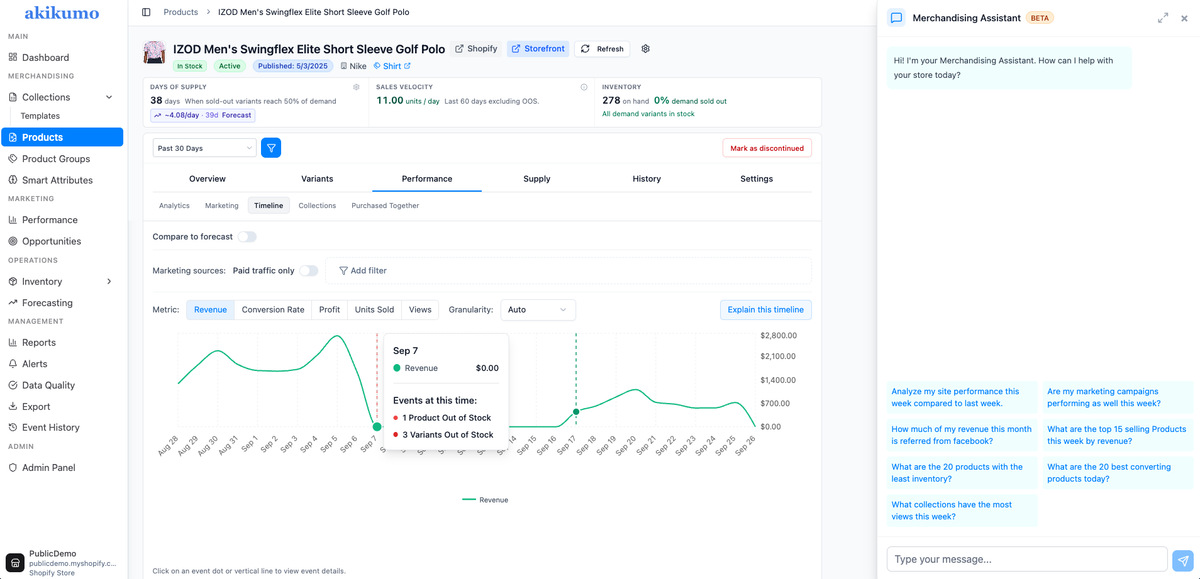
Akikumo is a Shopify merchandising intelligence tool that catches everything in this framework automatically and fixes it. Instead of manually scraping JSON files or checking ad links one by one, Akikumo surfaces your hidden friction points so you can focus on driving revenue rather than hunting down stockouts.
What Akikumo Does:
- Surfaces sold-out and partially sold-out products in prime collection positions
- Tracks wasted ad spend by cross-referencing UTM parameters with real-time inventory
- Automatically sorts collections by sales velocity, revenue, or inventory — updated every 12-24 hours
- Tracks collection-level analytics that Shopify doesn't capture natively
- Flags data quality issues (ie. misspellings, missing costs, inconsistent values)
- Separates TikTok Shop orders from other Shopify sales channels in reporting
- Provides variant-level inventory timelines and days-of-supply calculations
The Impact:
- 24 hrs → 20 min: Collection management (Bogey Brothers)
- 15 hrs → under 1 hr: Weekly restock time (Desert Sol)
Stop letting hidden catalog errors drain your revenue. See how Akikumo automatically surfaces your store's friction points so you can fix them before they cost you another customer. [Book a Demo / Explore the Akikumo Shopify App]